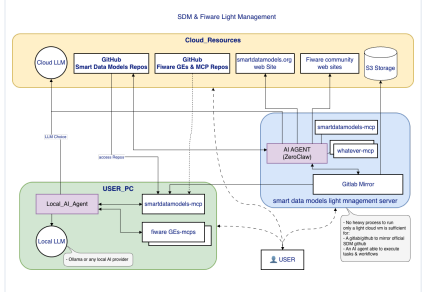
With this MCP configuration file you will be capable to use Smart Data Models locally in your AI agent.

{
  "mcpServers": {
    "smartdatamodels": {
      "type": "http",
      "serverUrl": "https://opendatamodels.org/mcp/v1"
    }
  }
}Search the Smart Data Models (SDM) catalog by keyword, domain name, or partial model name. Use this when the user wants to discover which data models exist for a topic (e.g., ‘parking’, ‘weather’, ‘energy meter’). Returns a list of matching model names and their subjects. Example: search_data_models({“query”: “air quality”, “domain”: “SmartEnvironment”})
2. get_data_model
Retrieve the complete JSON Schema and metadata for a specific Smart Data Model. Use this when the user already knows the model name and wants its full definition, required fields, attribute types, or documentation URL. Example: get_data_model({“model_name”: “WeatherObserved”, “include_examples”: true})
3. list_domains
List all available SDM domains (top-level industry categories) with the count of data models in each. Use this as the entry point when the user wants an overview of what sectors are covered, or before calling list_models_by_domain. No parameters required. Example: list_domains({})
4. list_models_by_domain
List all data model names available within a specific SDM domain. Use this when the user wants to browse all models in a sector such as SmartCities or SmartHealth. Call list_domains first to confirm valid domain names. Example: list_models_by_domain({“domain”: “SmartEnergy”})
5. validate_data
Validate a JSON payload against the schema of a specific Smart Data Model. Use this when the user has an IoT payload or NGSI-LD entity and wants to check if it conforms to the standard. Returns a structured result with pass/fail and a list of specific validation errors if any. Example: validate_data({“model_name”: “WeatherObserved”, “data”: {“id”: “urn:ngsi-ld:WeatherObserved:001”, “type”: “WeatherObserved”, “temperature”: {“type”: “Property”, “value”: 22.3}}})
6. get_related_models
Find Smart Data Models that are semantically related to a given model. Useful for discovering adjacent models when building multi-entity systems — e.g., related models for ‘OffStreetParking’ might surface ‘ParkingSpot’ and ‘ParkingGroup’. Example: get_related_models({“model_name”: “OffStreetParking”, “relationship_type”: “all”})
7. get_attributes_for_model
List all attributes (properties) of a specific Smart Data Model, including each attribute’s NGSI type (Property, GeoProperty, or Relationship), data type, description, recommended units, and reference model URL. Use this after get_data_model when the user wants to understand what fields a model has, what values they accept, or how to construct a valid NGSI-LD payload. Example: get_attributes_for_model({“model_name”: “WeatherObserved”})
8. get_attribute_details
Get full details for a single attribute within a Smart Data Model — including its description, NGSI type (Property/GeoProperty/Relationship), data type, recommended units, format constraints, and reference model URL. Use this when the user asks what type a specific field is, what units it uses, or how to populate it. Example: get_attribute_details({“model_name”: “WeatherObserved”, “attribute”: “temperature”})
9. find_subject_by_model_name
Find which SDM subject (repository group, always prefixed with ‘dataModel.’) a data model belongs to, given only the model name. Use this when you have an entity type from an incoming NGSI-LD payload but don’t know its subject — for example, if a payload contains ‘type: WeatherObserved’ and you need to resolve its subject before calling get_data_model or validate_data. Example: find_subject_by_model_name({“model_name”: “WeatherObserved”})
10. fuzzy_find_model
Search for a data model by approximate or misspelled name using fuzzy matching. Use this as the recovery step whenever get_data_model returns MODEL_NOT_FOUND — it finds the closest real model names even when the spelling is off. Returns ranked candidates with similarity scores. Example: fuzzy_find_model({“model_name”: “WeatherFora”, “threshold”: 80})
11. get_subject_repo_url
Return the GitHub repository URL for an SDM subject (e.g., ‘dataModel.Weather’). Use this when the user wants to browse the source files, open issues, or cite the authoritative schema location for a subject group. Example: get_subject_repo_url({“subject”: “dataModel.Weather”})
12. get_model_repo_url
Return the GitHub repository URL(s) for a specific data model by name. Use this when the user needs a direct link to the schema source, examples, or documentation on GitHub. Example: get_model_repo_url({“model_name”: “WeatherObserved”})
13. get_full_catalog
Return the complete list of all data models within a specific domain, including names, subjects, descriptions, and repository links. Use this when the user needs a comprehensive structured overview of an entire domain for bulk processing, analysis, or selection. A domain filter is mandatory to prevent returning the entire catalog in one call. Example: get_full_catalog({“domain”: “SmartEnvironment”})
14. export_model_attributes
Export the attributes of a data model as a flat delimited string, with caller-selected meta-fields per attribute. Use this when a data engineer needs a CSV-ready or pipe-delimited listing for database column mapping, ontology alignment, or spreadsheet import. Available meta-fields: property, type, dataModel, repoName, description, typeNGSI, modelTags, format, units, model. Example: export_model_attributes({“model_name”: “WeatherObserved”, “separator”: “,”, “fields”: [“property”, “type”, “typeNGSI”, “units”]})
15. get_model_context
Return the NGSI-LD @context URL and context content for a specific data model. This is required when building valid NGSI-LD linked-data payloads — without the correct @context, the payload is not valid linked data and will be rejected by NGSI-LD brokers. Use this before constructing or validating a normalized payload. Example: get_model_context({“model_name”: “WeatherObserved”})