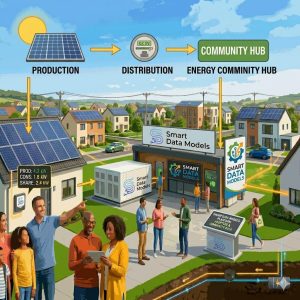
SunSpec Information Models Join Smart Data Models: 7 Candidate Models for Solar Inverters, Batteries and Meters

Smart Data Models’ Candidates repository now includes a new candidate standard from the SunSpec Alliance: sunspec-models, with 7 candidate models for the data that solar inverters, batteries and meters expose: device identity, AC and DC measurements, ratings and settings, storage state and grid metering. The SunSpec model definitions are published under Apache-2.0. Like every candidate, each model comes with a JSON Schema, an NGSI-LD @context and all four example serializations (NGSI-v2 and NGSI-LD, key-values and normalized), each validated against its schema.

About the SunSpec Information Models

The SunSpec Information Models are the open, Modbus-based data models used by most PV inverter manufacturers, and SunSpec Modbus is one of the DER communication protocols allowed by IEEE 1547-2018. Each model has a number and a fixed list of named points (registers) with a type, units, a scale factor and, for states and alarms, named symbols. Model 1 identifies the device, the 100 series are the classic inverter models, the 200 series meters and the 700 series the IEEE 1547-2018 DER models. This candidate uses release v2026-04-20, which has 113 models.

The models

Model SunSpec model What it reports Points
common 1 Manufacturer, model, options, version, serial number, Modbus address 6
inverter_three_phase 103 Classic three-phase inverter: currents, voltages, power, energy, temperatures, operating state, events 31
DERMeasureAC 701 IEEE 1547 DER AC measurement: totals and per phase, injected and absorbed energy, inverter and grid connection state, alarms 60
DERCapacity 702 Nameplate ratings and current settings: power, apparent and reactive power, charge/discharge rates, voltage and current limits, supported control modes 42
DERStorageCapacity 713 Storage energy rating and availability, state of charge, state of health 5
DERMeasureDC 714 DC side, with one entry per DC port (PV string, battery…) 7 + 11 per port
ac_meter_abcn 203 Three-phase (wye) meter: currents, voltages, power, power factor, imported and exported energy 62

One consistent example installation

SunSpec devices are read locally over Modbus and there is no open dataset of SunSpec readings, so the examples are synthetic, and say so. They describe one fictitious installation at the same instant: a 10 kW three-phase hybrid inverter producing 6.42 kW from two PV strings while charging its 10.24 kWh battery (66.5 % state of charge), seen both through the classic model 103 and the 700-series DER models, and a grid meter at the connection point.

Translation notes

  • SunSpec names, verbatim. Entity types are the SunSpec model names (DERMeasureAC, ac_meter_abcn…) and every attribute keeps its point name (W, PhVphA, TotWhInj…), so anyone who knows SunSpec recognises them at once.
  • Values already scaled. On the wire, SunSpec sends integers plus scale-factor registers. Here every value is given in its real unit (watts, volts, hertz…), so the *_SF points are dropped; each description says which scale factor applied.
  • Readable states and alarms. Enumerations use SunSpec’s symbol names (RUNNING, CONNECTED) and alarm bitfields become lists of the active alarm names.
  • Two small additions. refCommon links each model to the device’s common entity, and dateObserved records when a measurement was read. SunSpec itself has neither.
  • Licence checked at the source. The model definitions are Apache-2.0 in SunSpec’s GitHub repository. A few upstream inconsistencies (unit spellings, power factor as a fraction in one model and a percentage in others) are documented in the metadata.

Try it, and tell us what’s missing

These are Candidates: first, carefully sourced translations that are not yet official Smart Data Models subjects. The main open question is how they relate to the existing dataModel.Energy (InverterDevice, ThreePhaseAcMeasurement), dataModel.GreenEnergy (PhotovoltaicDevice, PhotovoltaicMeasurement) and dataModel.Battery models, which describe the same equipment with Smart Data Models attribute names; a mapping between the two is a natural next step. Other SunSpec models (DER controls and curves, batteries, weather stations, trackers) can follow.

Browse the models, open an issue, or send a PR:
👉 https://github.com/smart-data-models/Candidates/tree/master/standards/sunspec-models

Battery Pass Joins Smart Data Models: 7 Candidate Models for the EU Battery Passport

Smart Data Models’ Candidates repository now includes a new candidate standard translated from the Battery Pass Data Model: battery-pass-data-model, with 7 candidate models covering the full content of the EU battery passport. The source model is published under CC-BY-4.0. Like every candidate, each model comes with a JSON Schema, an NGSI-LD @context and all four example serializations (NGSI-v2 and NGSI-LD, key-values and normalized), each validated against its schema.

About the Battery Pass Data Model

From February 2027, the EU Battery Regulation (EU) 2023/1542 requires a digital battery passport for every electric-vehicle battery, every light means of transport (LMT) battery and every industrial battery above 2 kWh placed on the EU market. The Battery Pass consortium, a project funded by the German Federal Ministry for Economic Affairs and Climate Action, turned the regulation’s requirements into a set of data attributes (later standardised as DIN DKE SPEC 99100) and into a machine-readable data model, written as SAMM aspect models. This translation uses data model version 1.2.

The models

Model What it covers
GeneralProductInformation passport and product identifiers, battery category and status, manufacturer and economic operator, manufacturing date and place, mass, warranty
CarbonFootprintForBatteries carbon footprint per kWh, its split by lifecycle stage, performance class and supporting study
Circularity dismantling and removal documents, spare-part sources, recycled and renewable content, safety measures, end-of-life information
Labeling EU declaration of conformity, test report, and the symbols and meanings of the battery’s labels
MaterialComposition chemistry, materials with critical raw material flags, hazardous substances with their GHS impacts
PerformanceAndDurability rated capacity, energy, voltage, power and lifetime, plus the battery’s changing condition: state of charge, state of certified energy, capacity fade, cycles, throughput, temperature exposure and negative events
SupplyChainDueDiligence due diligence report, third-party assurances and supply chain indices

The seven entities of one passport are linked to its GeneralProductInformation, which holds the passport and product identifiers. PerformanceAndDurability carries the dynamic state of health that the regulation requires for EV and industrial batteries, which makes it a natural fit for NGSI-LD context brokers that receive updates from a battery management system.

About the examples

No battery passport is available as open data yet, so the examples are synthetic, and each one says so. They describe a single fictional 95 kWh NMC electric-vehicle battery across all seven models. They reuse the data model’s own example values where it has them, and the other values are physically consistent with each other (108 cells in series, 396 V nominal, 240 Ah). They give a complete, valid picture of what a full passport looks like in NGSI-LD.

Translation notes

  • Current source, not stale artefacts. The structure comes from the JSON Schemas generated from the SAMM models. Names, descriptions and units come from the current SAMM source files, which renamed three properties after those schemas were generated (for example batteryTechnicalProperties).
  • Names preserved verbatim. Property names are kept exactly as the source writes them, including the misspelled warrentyPeriod, thirdPartyAussurances and supplyChainIndicies.
  • Units made explicit. Units are declared in the SAMM source but missing from the generated schemas, so they were added to each attribute’s description, for example kilowatt-hours for rated energy and minutes for time at extreme temperatures.
  • Feedback for the source. A few issues were found in the published model, such as an email pattern that rejects normal addresses and a warranty period that cannot exceed 12 months. They are listed in the candidate’s metadata to report upstream.
  • Licence verified. The data model is CC-BY-4.0 (it was CC-BY-NC-4.0 until October 2025).

Try it, and tell us what’s missing

These are Candidates: first, carefully sourced translations that are not yet official Smart Data Models subjects. Before that step, the main open questions are how they relate to the existing dataModel.Battery subject (its BatteryStatus overlaps the battery condition), to the separate Catena-X battery passport model, and to the UNTP Digital Product Passport candidate, a generic product passport that could carry this content.

Browse the models, open an issue, or send a PR:
👉 https://github.com/smart-data-models/Candidates/tree/master/standards/battery-pass-data-model

Open Energy Ontology Joins Smart Data Models: 5 Candidate Models for Power Plants, Storage and Grids

Smart Data Models’ Candidates repository now includes a new candidate standard translated from the Open Energy Ontology (OEO): open-energy-ontology, with 5 candidate models for power plants, generating units, energy storage and supply grids. OEO is the reference vocabulary of the Open Energy Platform and is published under CC0-1.0. Like every candidate, each model comes with a JSON Schema, an NGSI-LD @context and all four example serializations (NGSI-v2 and NGSI-LD, key-values and normalized), each validated against its schema.

About the Open Energy Ontology

OEO is a domain ontology for energy system modelling and analysis, built on the Basic Formal Ontology (BFO). Release v2.14.0 (October 2026), the one translated here, has more than 1,300 classes of its own. They cover the physical energy system (power plants, units, converting components, storage, grids, fuels and energy carriers), quantities and units, and the research side of the field: models, scenarios, studies and data sets.

The models

Model OEO class OEO subclasses covered Examples of oeoClass values
PowerPlant power plant (OEO_00000031) 37 lignite power plant, combined cycle gas power plant, offshore wind farm, pumped hydro storage power plant
PowerGeneratingUnit power generating unit (OEO_00000334) 30 gas fired power unit, nuclear power unit, wind energy converting unit, PV panel
EnergyStorageObject energy storage object (OEO_00000159) 29 lithium-ion battery, flow battery, sensible heat storage object, underground hydrogen storage object
GridComponent grid component (OEO_00020006) 19 grid node, switchyard, transformer, HVDC-line, vehicle charging station
SupplyGrid supply grid (OEO_00000200) 7 transmission grid, distribution grid, gas grid, heating grid, control area

The models are linked by OEO’s own relations: a plant hasPart its units, a component is partOf a grid, grid nodes are isConnectedTo each other, a grid has a hasSource and a hasSink, and a unit uses its fuel (natural gas, lignite, … as OEO class IRIs). In NGSI-LD these become Relationships.

Grounded in real data

Four of the five examples describe one real installation, using Open Power System Data records (CC-BY-4.0, from the BNetzA and UBA power plant lists): the Irsching power plant in Bavaria, its unit 4 “Ulrich Hartmann” (561 MW net, efficiency 0.604, natural gas combined cycle), the extra-high-voltage grid node it connects to, and the TenneT transmission grid. Units and plants are identified by their ENTSO-E EIC codes.

Translation notes

  • One entity type per branch, not one per class. OEO is mainly a classification taxonomy. Following the approach of the Brick candidate, each model is generic, and an oeoClass attribute holds the specific OEO subclass. It is restricted to an enum of every class in that branch (122 classes in total), none of them deprecated.
  • Readable names, real IRIs. OEO identifies its classes by numbers such as OEO_00000031, so the entity and property names are the PascalCase or camelCase form of OEO’s English labels. Every @context maps them back to the exact OEO or BFO IRI.
  • Quantities flattened. OEO models capacities, efficiencies and dates as separate quantity-value classes (nameplate capacity, declared net capacity, energy storage capacity, efficiency value, full load hours…). Here they are plain numeric attributes in a fixed unit (MW, MWh, ratio, hours, years).
  • A few practical extras. operationalStatus, eicCode, gridOperator and refGridConnectionPoint are not OEO terms. They were added for operational NGSI-LD use and are marked as such in each schema.

Try it, and tell us what’s missing

These are Candidates: first, carefully sourced translations that are not yet official Smart Data Models subjects. Before that step, the main open question is overlap with existing energy models: dataModel.Energy, dataModel.GreenEnergy, dataModel.EnergyStorage, dataModel.EnergyCIM and the SAREF4ENER and SAREF4GRID candidates. Natural next steps are energy converting components (generators, turbines), combined heat and power and heat plants, and OEO’s scenario and study branch.

Browse the models, open an issue, or send a PR:
👉 https://github.com/smart-data-models/Candidates/tree/master/standards/open-energy-ontology

New pysmartdatamodels Version 0.8.2.0: Semantic Identification for Data Spaces

We are happy to announce a new release of our Python package, pysmartdatamodels, version 0.8.2.0. The headline feature is aimed squarely at data spaces: a new function that can give semantic meaning to a payload even when the party who sent it never provided one.

What’s New in This Version?

Semantic identification for data spaces: identify_or_draft_datamodel()

In a data space, you routinely receive payloads from other participants with no guarantee they follow any particular standard. identify_or_draft_datamodel() takes any such payload and does one of two things:

  • If it recognizes the payload as an existing Smart Data Model, it returns that model’s real schema, together with a full validation of the payload against it.
  • If it doesn’t, it drafts a brand new schema.json on the spot — following the same structural conventions as a real Smart Data Model — so you have a ready-to-review starting point instead of nothing at all.

It accepts the payload in any of the three formats actually used in practice — plain key-values, NGSI-v2 normalized, or NGSI-LD normalized — detecting and handling the right one automatically:

from pysmartdatamodels import pysmartdatamodels as sdm

payload = {
    "id": "urn:ngsi-ld:WeatherObserved:station-042",
    "type": "WeatherObserved",
    "temperature": 21.5,
    "relativeHumidity": 0.6
}

result = sdm.identify_or_draft_datamodel(payload)
print(result["schema"]["source"])   # "existing" -- it recognized WeatherObserved
print(result["schema"]["validation"]["result"])  # True

When the payload’s own “type” doesn’t match anything, you can optionally ask it to try a softer, attribute-based match against the whole catalog before giving up and drafting a new schema:

result = sdm.identify_or_draft_datamodel(payload, fuzzy=True, fuzzy_threshold=0.3)

And when nothing matches at all, the drafted schema isn’t just a bare shape guess — any attribute whose name is already established elsewhere in the catalog (over 160,000 attribute definitions) gets its real description, model reference, and units reused automatically, so only genuinely new attributes are left with a plain TODO placeholder.

A real validate_payload()

validate_payload(datamodel, subject, payload) existed before but didn’t actually validate anything. It now runs full JSON Schema validation against the live schema of the data model you name, confirms the payload’s “type” matches, and separately flags – without failing – any attribute that isn’t part of the official definition.

Reliability and performance fixes

  • generate_sql_schema() no longer crashes on attributes that can hold more than one type (e.g. a Property that can also be a Relationship), and no longer generates colliding enum type names when two unrelated models happen to share an attribute name.
  • validate_data_model_schema() no longer terminates your entire Python process on a bad input — it returns an error result like every other function in the package.
  • The ~160,000-entry attribute database is now cached in memory instead of being re-read from disk on every single function call — noticeably faster for any code calling the per-attribute lookup functions in a loop.

Get the Latest Version

Update your installation with:

pip install --upgrade pysmartdatamodels

➔️ Get the package on PyPI

New pysmartdatamodels Version 0.8.1.0: Refreshed Data (reduced size 20 times with same functionality)

We are happy to announce a new release of our Python package, pysmartdatamodels, version 0.8.1.0, with a refreshed attribute database, a smaller download, and a cleanup of some leftover dead code.

What’s New in This Version?

Refreshed Data, End to End

The package’s bundled data — the official list of data models, the attribute metadata, and the full attribute database — had gone stale. Fixing this surfaced two real issues in our own publication pipeline, now resolved:

  • One data model repository had accidentally been left private, which was silently breaking the daily metadata regeneration every time it ran.
  • The database backing the attribute export (see below) was far less complete than it should have been. It’s now fully backfilled: 164,926 attribute records across all 82 subjects.

As always, you don’t need to upgrade the package just to get fresh data — calling update_data() pulls the latest information directly:

from pysmartdatamodels import pysmartdatamodels as sdm
sdm.update_data()

Smaller Install, Compressed Attribute Database

The full attribute database is now shipped gzip-compressed inside the package (~5MB instead of ~110MB) — the installed package footprint drops from over 100MB to under 10MB. This is fully transparent if you use the documented functions (load_all_attributes(), description_attribute(), etc.) — nothing changes in how you call them.

The same compressed file is now also available for direct download, alongside the existing uncompressed one, from the attribute database export page.

Cleanup

Removed a small piece of dead code in generate_sql_schema() left over from an earlier implementation — no change in behavior, just a cleaner function. Thanks to the community member who originally reported it.

Get the Latest Version

Update your installation with:

pip install --upgrade pysmartdatamodels

➡️ Get the package on PyPI

New pysmartdatamodels Version 0.8.0.11: More Reliable SQL Schema Generation

We are happy to announce a new release of our Python package, pysmartdatamodels, version 0.8.0.11, focused on making the SQL schema generation function more robust, fixing how the package exposes its functions, and keeping our GitHub source and published package in sync.

What’s New in This Version?

More Reliable SQL Schema Generation

The generate_sql_schema() function, which turns a data model’s model.yaml into a ready-to-use PostgreSQL CREATE TABLE statement, received three fixes:

  • Column names are now properly quoted, so attribute names that are reserved words or mixed case no longer produce invalid SQL.
  • Properties using anyOf are now supported, in addition to oneOf.
  • The function no longer emits a duplicate id column in the generated schema.

Example:

from pysmartdatamodels import pysmartdatamodels as sdm

sql = sdm.generate_sql_schema("https://raw.githubusercontent.com/smart-data-models/dataModel.Weather/master/WeatherForecast/model.yaml")
print(sql)

More Usable Imports

You can now import the package’s main functions directly from the top level, instead of always going through the submodule:

from pysmartdatamodels import generate_sql_schema, load_all_datamodels

The documented usage pattern below continues to work exactly as before:

from pysmartdatamodels import pysmartdatamodels as sdm

Repository Housekeeping

The source code published on GitHub and the package published on PyPI had drifted apart over the last few releases. With this version, both are back in sync, so what you see in the repository is exactly what you get when you pip install the package.

Get the Latest Version

Update your installation with:

pip install --upgrade pysmartdatamodels

➡️ Get the package on PyPI

Our Commitment to Open and Interoperable Data

We are committed to making data interoperability easier for everyone. Thanks to everyone in the community who reports issues and helps us keep improving pysmartdatamodels!

Introducing the Smart Data Models Candidates Repository

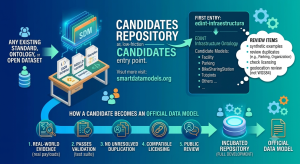
The Smart Data Models now has a Candidates repository — a low-friction entry point where any existing standard, ontology or open dataset can be translated into the SDM shape (JSON Schema + NGSI-LD context + examples) before anyone commits to the full contribution process. The first entry, translated from the EDINT Infrastructure Ontology, is live today — and it needs your help to move forward.

What is the Candidates repository?

Until now, turning an external standard into a Smart Data Model meant going almost straight to the Incubated repository, where a contributor actively develops the model to the point of passing our full validation suite and preparing it for official publication. That’s the right process once someone is committed to doing the work — but it leaves no room for a lighter step: “here is a standard that looks like it maps well onto NGSI-LD — does anyone want to develop this further?”

The Candidates repository fills that gap. It maps existing standards — ontologies, open data schemas, sector vocabularies — into the SDM format (JSON Schema, JSON-LD context, key-value and NGSI-LD normalized examples) as a starting point, organized standard-first:

standards/<standard-slug>/
  standard-metadata.yaml
  models/<EntityName>/
    schema.json
    context.jsonld
    examples/
      example.json
      example-normalized.jsonld

A candidate is not a finished data model. It’s a proposal: a structurally valid, plausible translation that any user of Smart Data Models can pick up, test against real payloads, comment on, correct, or use as the basis for a full contribution to Incubated.

The first example: the EDINT Infrastructure Ontology

The first entry, edint-infraestructura, translates the EDINT Infrastructure Ontology — a formal OWL vocabulary developed under the EU-funded EDINT (Espacio de Datos para las Infraestructuras Urbanas Inteligentes) project for describing a municipality’s public and private facilities: educational, cultural, social and sports centers, health centers, on-street and off-street parking, and shared-bicycle stations, together with the sensors, observations, management roles and organizations involved in operating them.

Eleven candidate models were generated: Facility, Parking, BikeSharingStation, ObservationPoint, AccessSensor, CountingSensor, AccessObservation, CountingObservation, Violation, ManagementRole and Organization. Every schema is valid JSON Schema (Draft 2020-12) and every example validates against its own schema — but that’s where “finished” stops. In the spirit of being upfront about what a Candidate actually is, here’s exactly where this one stands:

  • Real examples exist for only one of the eleven models. Facility is grounded in a real record from the source ontology’s own example data (a municipal day-care center in Madrid). The other ten — the sensors, observations, violations, roles — have plausible but synthetic example payloads, because the source ontology itself doesn’t ship real instance data for them. This is the single most useful thing the community could contribute right now: real payloads from an actual access-control sensor, a real counting observation, a real management-role record.
  • Two models likely duplicate existing official subjects. Parking and Organization are thin, attribute-free specializations in the source ontology and may well overlap with the existing official dataModel.Parking and dataModel.Organization. This needs a real review before either goes any further.
  • The source ontology is licensed CC-BY-SA-4.0 (ShareAlike), while SDM contributions are conventionally CC-BY-4.0. This hasn’t been resolved and is flagged directly in the candidate’s standard-metadata.yaml for whoever picks this up next.
  • Geolocation needs a second look. The source ontology’s geometry is expressed in a projected coordinate system (not WGS84), so the example coordinates here are illustrative Madrid locations, not verified reprojections of the original data.

None of this makes the candidate useless — quite the opposite. It’s exactly the kind of concrete, checkable list that turns “someone should look into this standard” into a set of small, tractable tasks anyone can pick up.

How a Candidate could become an official data model

There is no formal graduation process yet, and we’d rather propose one in the open than invent it quietly. Here’s a first draft, and we’re actively looking for feedback on it:

  1. Real-world evidence. At least one model in the candidate has real, non-synthetic example payloads from an actual system or dataset using it.
  2. Passes validation. The candidate’s schemas and examples pass the standard SDM test suite with zero blocking failures (the same 12 checks used for Incubated contributions).
  3. No unresolved duplication. Any overlap with an existing official model has been explicitly checked and either resolved (extend the existing model instead) or justified (the candidate covers something genuinely different).
  4. Compatible licensing. The source material’s license allows redistribution under the terms Smart Data Models publishes under.
  5. A short public review. A brief comment period on the candidate’s pull request or a linked issue, open to anyone in the community.

Once a candidate clears these, it moves into the normal Incubated workflow for full development ahead of official publication.

How to get involved

  • Browse the repository: github.com/smart-data-models/Candidates
  • Search all candidates: smart-data-models.github.io/Candidates — a searchable, always up to date index of every candidate standard and model
  • Contribute a real example for any of the eleven EDINT models above — open a pull request against standards/edint-infraestructura/, or an issue if you’re not sure how.
  • Propose a new candidate: if you know a standard, ontology or open dataset that should have an SDM mapping, open an issue describing it, or submit the translated standards/<slug>/ folder directly.
  • Give feedback on the promotion criteria above — they’re a first draft, not a final decision.

Find all published Smart Data Models at smartdatamodels.org/ search menu, and everything currently in development in the Incubated repository.

New data models EnergyCommunity and EnergyProsumer at subject dataModel.EnergyCommunity

We are pleased to announce the publication of EnergyCommunity and EnergyProsumer within the subject dataModel.EnergyCommunity.

EnergyCommunity: A collective entity representing an energy community enabling shared production, consumption, and storage of energy among its members.

EnergyProsumer: A role played by an individual or organization that both consumes and produces energy within an energy community.

We are grateful to Rodi Jolak from RISE Research Institutes of Sweden (Contributor of EnergyCommunity and EnergyProsumer data models), for his contributions to these data models.


Use smartdatamodels in your local AI agent with this MCP server

With this MCP configuration file you will be capable to use Smart Data Models locally in your AI agent.

{
  "mcpServers": {
    "smartdatamodels": {
      "type": "http",
      "serverUrl": "https://opendatamodels.org/mcp/v1"
    }
  }
}
More information here
These functions are available
1. search_data_models
Search the Smart Data Models (SDM) catalog by keyword, domain name, or partial model name. Use this when the user wants to discover which data models exist for a topic (e.g., ‘parking’, ‘weather’, ‘energy meter’). Returns a list of matching model names and their subjects. Example: search_data_models({“query”: “air quality”, “domain”: “SmartEnvironment”})
2. get_data_model
Retrieve the complete JSON Schema and metadata for a specific Smart Data Model. Use this when the user already knows the model name and wants its full definition, required fields, attribute types, or documentation URL. Example: get_data_model({“model_name”: “WeatherObserved”, “include_examples”: true})
3. list_domains
List all available SDM domains (top-level industry categories) with the count of data models in each. Use this as the entry point when the user wants an overview of what sectors are covered, or before calling list_models_by_domain. No parameters required. Example: list_domains({})
4. list_models_by_domain
List all data model names available within a specific SDM domain. Use this when the user wants to browse all models in a sector such as SmartCities or SmartHealth. Call list_domains first to confirm valid domain names. Example: list_models_by_domain({“domain”: “SmartEnergy”})
5. validate_data
Validate a JSON payload against the schema of a specific Smart Data Model. Use this when the user has an IoT payload or NGSI-LD entity and wants to check if it conforms to the standard. Returns a structured result with pass/fail and a list of specific validation errors if any. Example: validate_data({“model_name”: “WeatherObserved”, “data”: {“id”: “urn:ngsi-ld:WeatherObserved:001”, “type”: “WeatherObserved”, “temperature”: {“type”: “Property”, “value”: 22.3}}})
6. get_related_models
Find Smart Data Models that are semantically related to a given model. Useful for discovering adjacent models when building multi-entity systems — e.g., related models for ‘OffStreetParking’ might surface ‘ParkingSpot’ and ‘ParkingGroup’. Example: get_related_models({“model_name”: “OffStreetParking”, “relationship_type”: “all”})
7. get_attributes_for_model
List all attributes (properties) of a specific Smart Data Model, including each attribute’s NGSI type (Property, GeoProperty, or Relationship), data type, description, recommended units, and reference model URL. Use this after get_data_model when the user wants to understand what fields a model has, what values they accept, or how to construct a valid NGSI-LD payload. Example: get_attributes_for_model({“model_name”: “WeatherObserved”})
8. get_attribute_details
Get full details for a single attribute within a Smart Data Model — including its description, NGSI type (Property/GeoProperty/Relationship), data type, recommended units, format constraints, and reference model URL. Use this when the user asks what type a specific field is, what units it uses, or how to populate it. Example: get_attribute_details({“model_name”: “WeatherObserved”, “attribute”: “temperature”})
9. find_subject_by_model_name
Find which SDM subject (repository group, always prefixed with ‘dataModel.’) a data model belongs to, given only the model name. Use this when you have an entity type from an incoming NGSI-LD payload but don’t know its subject — for example, if a payload contains ‘type: WeatherObserved’ and you need to resolve its subject before calling get_data_model or validate_data. Example: find_subject_by_model_name({“model_name”: “WeatherObserved”})
10. fuzzy_find_model
Search for a data model by approximate or misspelled name using fuzzy matching. Use this as the recovery step whenever get_data_model returns MODEL_NOT_FOUND — it finds the closest real model names even when the spelling is off. Returns ranked candidates with similarity scores. Example: fuzzy_find_model({“model_name”: “WeatherFora”, “threshold”: 80})
11. get_subject_repo_url
Return the GitHub repository URL for an SDM subject (e.g., ‘dataModel.Weather’). Use this when the user wants to browse the source files, open issues, or cite the authoritative schema location for a subject group. Example: get_subject_repo_url({“subject”: “dataModel.Weather”})
12. get_model_repo_url
Return the GitHub repository URL(s) for a specific data model by name. Use this when the user needs a direct link to the schema source, examples, or documentation on GitHub. Example: get_model_repo_url({“model_name”: “WeatherObserved”})
13. get_full_catalog
Return the complete list of all data models within a specific domain, including names, subjects, descriptions, and repository links. Use this when the user needs a comprehensive structured overview of an entire domain for bulk processing, analysis, or selection. A domain filter is mandatory to prevent returning the entire catalog in one call. Example: get_full_catalog({“domain”: “SmartEnvironment”})
14. export_model_attributes
Export the attributes of a data model as a flat delimited string, with caller-selected meta-fields per attribute. Use this when a data engineer needs a CSV-ready or pipe-delimited listing for database column mapping, ontology alignment, or spreadsheet import. Available meta-fields: property, type, dataModel, repoName, description, typeNGSI, modelTags, format, units, model. Example: export_model_attributes({“model_name”: “WeatherObserved”, “separator”: “,”, “fields”: [“property”, “type”, “typeNGSI”, “units”]})
15. get_model_context
Return the NGSI-LD @context URL and context content for a specific data model. This is required when building valid NGSI-LD linked-data payloads — without the correct @context, the payload is not valid linked data and will be rejected by NGSI-LD brokers. Use this before constructing or validating a normalized payload. Example: get_model_context({“model_name”: “WeatherObserved”})